
DAO Workbook · DAO Lead
The Pay-Per-Task Scheme
Updated 27 Nov 2026
This guide helps the DAO Lead keep the list of paid tasks and their rates for a DAO that pays per task.
Steps
- Open your DAO and the Paid tasks & budget tab (or ☰ → DAO Lead → Paid tasks & budget).
- In Pay-Per-Task Scheme, type the task_id, for example OUT-01.
- Choose the Lane, or Whole DAO for a task any lane can do. Add a Scope if useful.
- Type the Task / deliverable and the Definition of Done (qualified when…).
- Type the Rate (USDT), choose the Basis and type the # planned.
- Once the proposal passes on the Kambria DAOs Framework, paste the link to the vote in Approved by vote (link). Tap Add (or Save changes when editing).
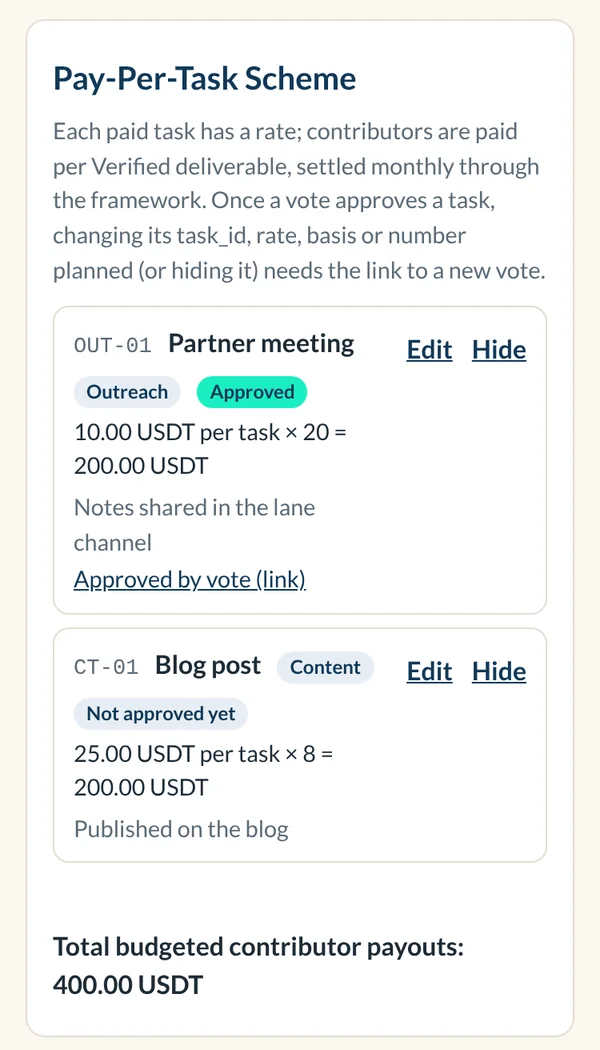
- The row shows the rate × # planned and the budgeted amount, with Approved or Not approved yet. The total shows under the list.
Good to know
- Only DAOs with the payment model Per task add paid tasks. Other DAOs see a note instead; the payment model is set in DAO settings.
- If the payment model changes away from Per task, the change applies to new tasks only. The paid tasks the DAO already has stay in the list, read-only, with the note The paid tasks it already has stay as they are (read-only): deliverables can still be linked to them and are paid at their rate. New paid tasks need the “Per task” payment model (DAO settings).
- Budgeted = Rate (USDT) × # planned. These amounts make up section A of the Budget Plan.
- Members pick a paid task when they submit a deliverable. They see the tasks of their lane and the Whole DAO tasks. A Verified deliverable is payable at the task's rate × the person's share.
- Once a task has a vote link, changing its task_id, Rate (USDT), Basis or # planned needs the link to a new vote. Paste the new link in Approved by vote (link) when you save.
- Hiding an approved task also needs a vote. The app asks: This task was approved by a vote. Paste the link to the vote that removes it:
- The title, Definition of Done, scope and lane of an approved task can change without a new vote.
- Contributors are paid on the Kambria DAOs Framework. There, the Organizer turns each approved task into a paid task with Add from Pay-Per-Task: it keeps the task_id and pays the task's rate, also in shares (for example 50% of 1 task). Only tasks with a vote link and a rate above 0 can be added.
- If you change an approved rate here (with a new vote), the framework warns the Organizer that the prices differ, and the Organizer taps Update the price there. A new price starts 3 days later.
- When a deliverable of a paid task is Verified, the Operator adds it to a list of paid tasks on the framework. Once the list is approved, the contributors collect their pay. The Cashbook then gets a line for each payment by itself, and the deliverable shows Paid on KDF in Contributions.
If something goes wrong
- This task was approved by a vote: paste the link to the new vote that approves the change.
- Another paid task already uses this task_id.
- Numbers are 0 or more. Rates and # planned can't be negative.
- Use letters, numbers, dots, dashes or underscores, for example OUT-01.
- This DAO does not pay per task (DAO settings → payment model). New paid tasks, and changes to the existing ones, need the Per task payment model.
- Add the link to the vote, starting with https:// This appears when the vote link is not a web link.
- A deliverable shows task_id not in the scheme: not paid until the DAO Lead adds it. Add that task to the scheme.