
Guardians
Cancel a proposal before it runs
Updated 27 Nov 2026
This guide helps Guardians stop a passed proposal during its waiting time, so a harmful decision never runs.
Before you start
- The Guardian role is on your own MetaMask, linked on My account (see Use your own MetaMask). The app sends this one action from there.
- That account needs a little POL, because here you pay a very small network fee yourself.
- Use a browser where MetaMask is installed.
Steps
- Open the ☰ menu and choose Proposals and votes (Guardian group).
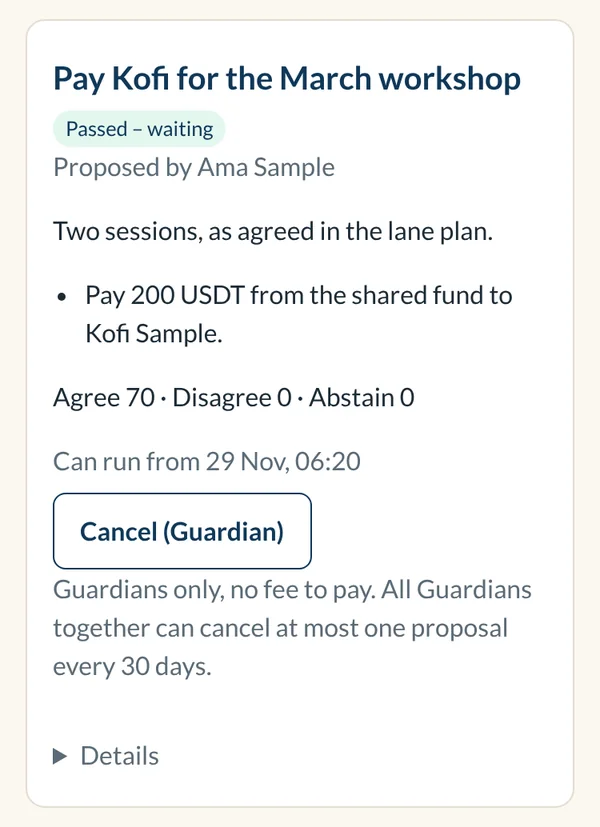
- Find the proposal. It must show Passed – waiting and Can run from a date in the future.
- Read what it runs. Open Details to see What it runs.
- Click Cancel (Guardian).
- Approve the action in MetaMask.
- Wait for Done. The proposal now shows Cancelled.
Good to know
- You can only cancel in the waiting time: after Start the wait and before someone clicks Run it. While voting is open, members decide by voting.
- All Guardians together can cancel at most one proposal every 30 days. Use it only for real harm, and tell the members why.
- Cancelling moves no money. The DAO can make a new, better proposal.
- To stop all payouts for a while instead, see Pause payouts in an emergency.
If something goes wrong
- That didn’t work. Please try again.: check that MetaMask is installed and open on the account with the Guardian role, that it has a little POL, and that the proposal has not run yet. Also check that no proposal was cancelled in the last 30 days.
- No Cancel (Guardian) button: the proposal is not in its waiting time, or none of your linked accounts has the Guardian role.