
Members & LP holders
Open your DAO and its members
Updated 27 Nov 2026
This guide helps members open their DAO's page, so they can see its shared fund, its rules and who is in it.
Before you start
- You are signed in and your account is ready (see Sign in and set up your account).
- You are in the DAO's Roster in the DAO Workbook.
Steps
- Open My account. Under Your DAOs, tap the name of your DAO. Or open the menu ☰ and tap DAO page and members under Members.
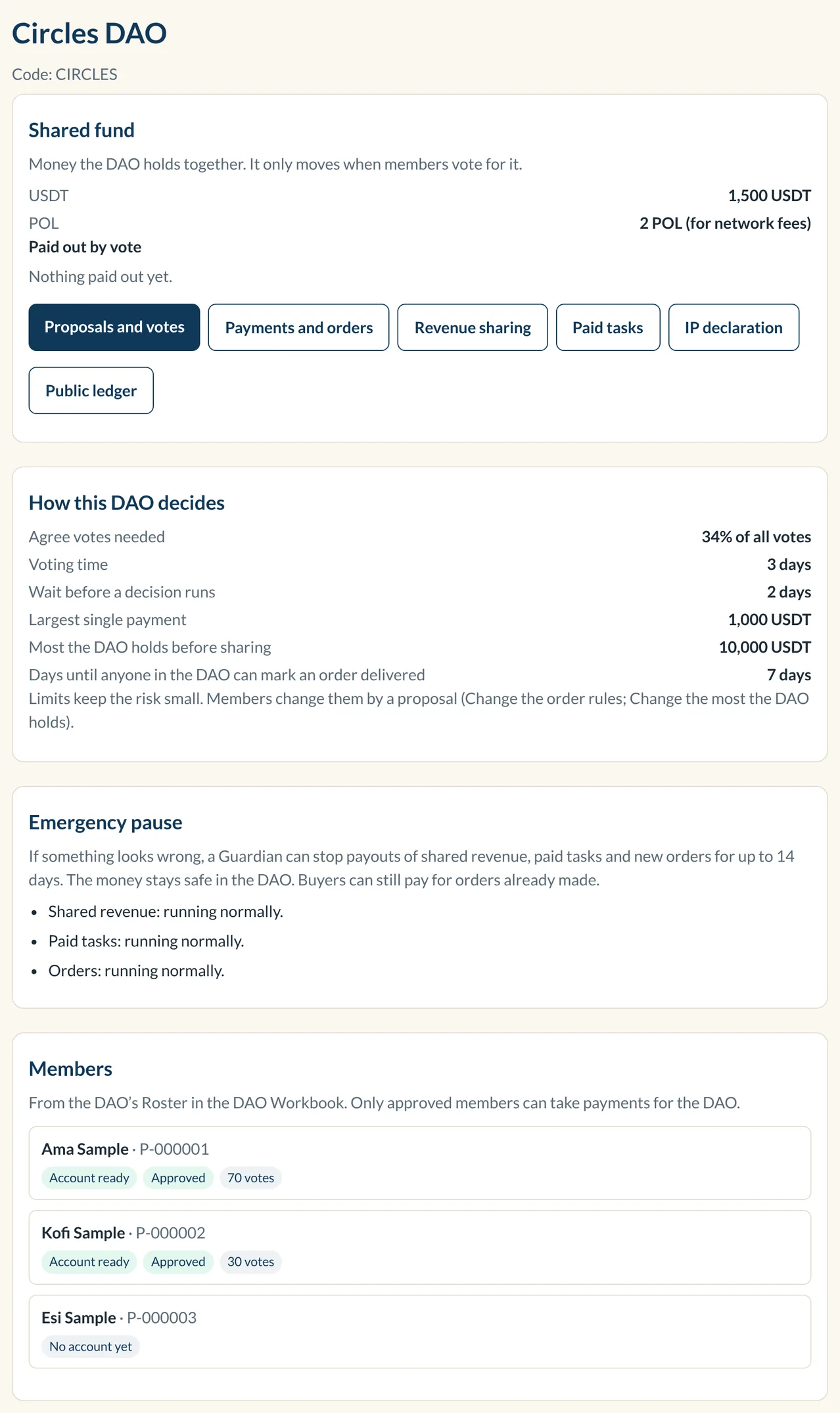
- At the top you see the DAO's name and its Code.
- The Shared fund card shows how much USDT the DAO holds together, and Paid out by vote lists what was paid from it.
- Below it are buttons to the DAO's other pages: Proposals and votes, Payments and orders, Revenue sharing, Paid tasks, IP declaration and Public ledger.
- How this DAO decides shows the rules: Agree votes needed, Voting time, Wait before a decision runs, Largest single payment, Most the DAO holds before sharing and Days until anyone in the DAO can mark an order delivered.
- Days until anyone in the DAO can mark an order delivered is the number of days after payment from which anyone approved in the DAO can mark an order delivered. The Organizer can change it on this page. Largest single payment changes only by a proposal (Change the order rules).
- Emergency pause shows Payouts are running normally. If a Guardian paused payouts, it shows Payouts of shared revenue are paused until <date>. and Paid tasks are paused until <date>. (see Pause payouts in an emergency).
- Members lists everyone in the Roster. Each person has tags: Account ready or No account yet, Approved or Not approved, their votes (for example 10 votes) and any role, such as Organizer or Guardian.
Good to know
- The shared fund only moves when members vote for it.
- Only approved members can ask buyers to pay for the DAO. The Organizer approves members on this page.
- The member list comes from the DAO's Roster in the DAO Workbook. To change your name or join a DAO, ask the Organizer or Kambria Ops.
- Settings → Advanced at the bottom shows technical details. You don't need them.
If something goes wrong
- Only members of this DAO can see this page. You are not in this DAO's Roster. Ask the Organizer.
- This DAO isn’t on the network yet. Kambria Ops has not created this DAO in the app yet.
- We couldn’t load this DAO. Please reload the page. Reload. If it keeps happening, try again later.
- You see Not approved next to your name. Ask the Organizer to approve you.