
Help
Common problems
Updated 26 Nov 2026
This guide helps everyone fix the problems people meet most often, so they can carry on without waiting for help.
Before you start
- Read the message on the screen carefully. Find it below.
- If nothing here helps, send Kambria Ops a screenshot.
Signing in
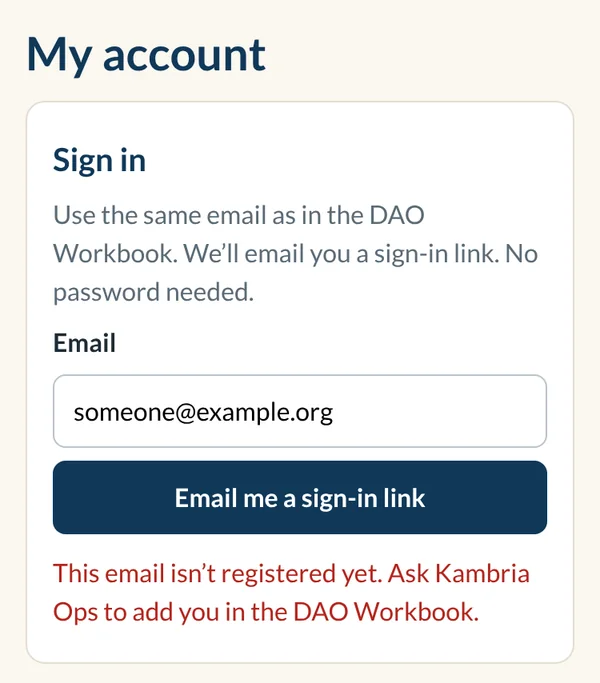
- This email isn’t registered yet. Ask Kambria Ops to add you in the DAO Workbook. Use the email Kambria Ops added for you, or ask them to add it.
- You’re signed in, but Kambria Ops hasn’t added you as a person yet. Kambria Ops must add you in the DAO Workbook.
- Please wait … seconds before asking for another link. or Too many sign-in emails were asked for. Please wait a few minutes and try again. Wait, then ask once. Use the newest email.
- We couldn’t send the email right now. Try again later; if it keeps happening, tell Kambria Ops.
- We couldn’t check that you’re a person. Please try again. The quick check before the email failed. Reload and try again. Send Kambria Ops the code shown in brackets.
- You seem to be offline. Check your connection and try again.
- No email? Check spam, and wait a minute. The link opens the site in the browser where you tap it.
Screen lock (passkey)
- This browser can’t protect your account with a screen lock. Use an up-to-date Chrome, Safari or Edge, on a device with a screen lock.
- The passkey was saved somewhere that can’t lock your account Some password managers, such as LastPass, can't do this yet. Try again and, when asked where to save the passkey, choose this device or your Google or Apple account. You can delete the "Kambria DAOs" passkey from the password manager.
- The screen lock was cancelled. Please try again. Tap the button again and confirm. If no passkey is offered on this device or on a new site address, restore once with your 12 words: see Your recovery words and a new device.
- Those aren’t 12 valid recovery words. Check the spelling and the order.
Actions in a DAO
- Working… confirm with your screen lock. The app waits for your fingerprint, face or PIN.
- Too many actions today. Please try again tomorrow. Kambria pays the fees and limits how many actions each person and each DAO can do in a day.
- That didn’t work. Please try again. Reload the page and try once more.
- Can’t reach the network right now. Please try again later. The network is busy or out of reach. Wait a few minutes.
- Only members of this DAO can see this page. Ask the Organizer to add you to the Roster in the DAO Workbook.
- This DAO isn’t on the network yet. Kambria Ops has not created this DAO in the app.
- We couldn’t load this DAO. Please reload the page.
If something goes wrong
- Write down what you did, the page name and the exact message, and send it with a screenshot to Kambria Ops.
- Never send your 12 recovery words to anyone, not even Kambria Ops.