
Members & LP holders
Collect your earnings
Updated 27 Nov 2026
This guide helps members and LP holders collect their part of the DAO's revenue and their paid tasks, so the money reaches their account.
Before you start
- Your account is set up (see Sign in and set up your account).
- You get money from a revenue-sharing cycle (for example as Order Handler or LP holder) or from a list of paid tasks.
Steps
- Open the menu ☰ and tap Earnings, or tap Earnings on My account.
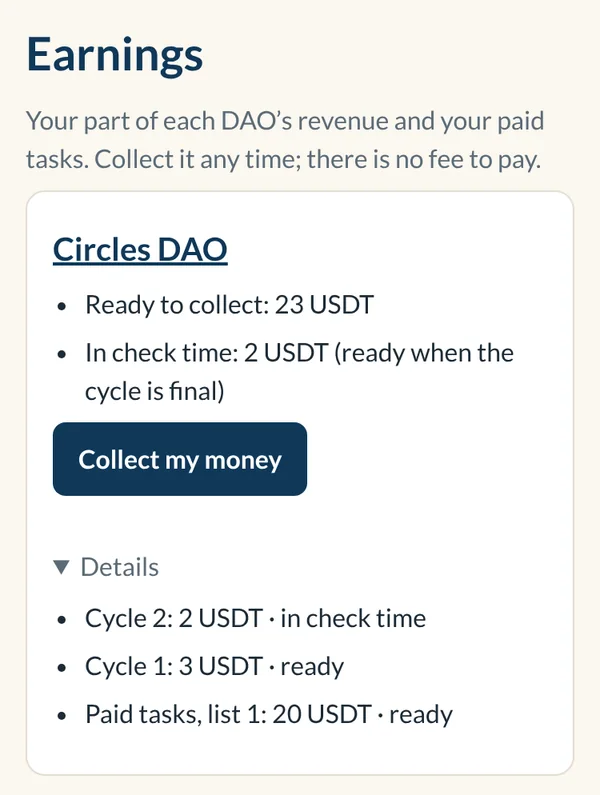
- Each DAO has a card. Ready to collect is money you can take now. In check time is money that is ready when the cycle is final. Waiting for approval is task pay that a task approver has not approved yet. Collected is what you already took.
- Open Details to see each part, for example Cycle 2: 12.50 USDT · ready or Paid tasks, list 1: 20 USDT · ready.
- Tap Collect my money and confirm with your screen lock once. One tap collects both your revenue shares and your paid tasks.
- You see Done. … USDT is in your account.
For LP holders
- LP (money put in) records the money you put into the DAO, about 1 LP for each USDT.
- In each cycle, part of the revenue goes to the LP holders pool. Your part is your LP divided by all counted LP, on the cycle's closing date (the end of its To day).
- LP you get after that date counts from the next cycle. Some accounts can be Not counted for the LP part; this is shown on Revenue sharing.
Good to know
- There is no fee to pay, and you can collect any time. Money stays ready until you collect it.
- Automatic payout: the Organizer can turn it on under Sharing settings on Revenue sharing. Then you see Automatic payout is on, and money comes to your account without you doing anything. When it is off, you collect on Earnings.
- Tap the DAO name on the card to see its cycles on Revenue sharing.
- If you also linked your own MetaMask, money for that account has its own button Collect from your other account.
If something goes wrong
- Set up your account on My account first.
- Nothing yet. When a DAO shares revenue or pays you for tasks, it shows here.
- The screen lock was cancelled. Please try again. Tap again and confirm.
- Too many actions today. Please try again tomorrow.
- That didn’t work. Please try again. Reload and try again; nothing was lost.