
Organizers
Set task prices
Updated 27 Nov 2026
This guide helps the Organizer add paid tasks and set their prices, so the Operator can list finished tasks and members get a fixed price for each.
Before you start
- The DAO agreed the tasks and their prices in USDT.
- Your account holds the Organizer role in this DAO. To add a new task you also need the Organizer role in the DAO Workbook.
- For a task from the DAO Workbook: the DAO approved it by a vote in the Workbook's Pay-Per-Task Scheme, with a rate above 0.
Steps
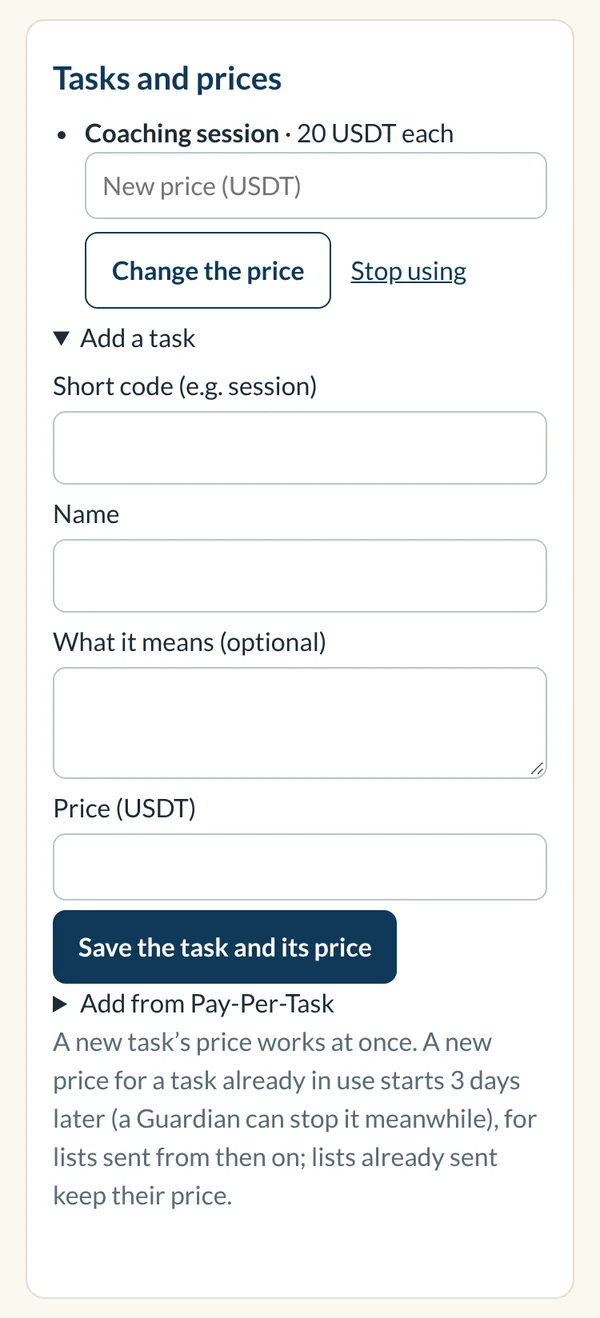
- Open the ☰ menu. Under Organizer, tap Paid tasks. Find Tasks and prices.
- To add a task, tap Add a task. Fill in Short code (e.g. session), Name, What it means (optional) and Price (USDT).
- Tap Save the task and its price and confirm with your screen lock.
- To add a task from the DAO Workbook, open Add from Pay-Per-Task. The app reads the Workbook's approved tasks, each shown as task_id · name · <…> USDT per task. Tap Add this task and confirm with your screen lock.
- The task then shows From Pay-Per-Task <…> with its task_id, and its price in <…> USDT per task.
- If the Workbook's rate changes after a new vote, the task shows The Workbook’s approved rate is <…> USDT per task, but the price here is <…> USDT per task. Tap Update the price and confirm with your screen lock.
- To change a price, type it in New price (USDT) next to the task and tap Change the price. Confirm with your screen lock.
- To stop a task, tap Stop using. It shows Not used any more. Tap Use again to bring it back.
- Wait for Done.
Good to know
- A new price is used for lists sent from now on; lists already sent keep their price.
- The short code can't be changed later. Use letters, numbers and dashes, for example session.
- Other members don't see stopped tasks. A task with No price yet can't go in a list.
- A new task's price works at once. A new price for a task already in use starts 3 days later: the task shows New price <…> from <…>. and a Guardian can stop it with Stop the price change (Guardian). No vote is needed. The money comes from the paid-task budget, which grows with each revenue-sharing cycle or by a proposal (Add to the paid-task budget).
- A task from Pay-Per-Task keeps the Workbook's task_id, and its price is always the Workbook's approved rate: it has no New price (USDT) box. It is paid in parts of a task, as in the Workbook: a deliverable two people share 50/50 is 50% of 1 task for each.
- While the update to the Workbook's rate waits, the task shows The price update to the Workbook’s rate is waiting (see the date above).
- No approved Pay-Per-Task tasks left to add. means every approved task of the Workbook is already in Tasks and prices.
If something goes wrong
- That didn’t work. Please try again. Check that the code, name and a price above 0 are filled in, then try again.
- Too many actions today. Please try again tomorrow.
- The screen lock was cancelled. Please try again.
- The DAO Workbook couldn’t be read. Only the DAO’s Organizer or Operator (in the Workbook) can use it.: ask Kambria Ops to give you the Organizer role in the DAO Workbook.
- This task is no longer an approved task of the Workbook’s Pay-Per-Task Scheme. Stop using it, or ask the DAO Lead.: tap Stop using, or ask the DAO Lead.