
DAO Workbook · DAO Lead
DAO settings
Updated 27 Nov 2026
This guide helps the DAO Lead keep the DAO's settings correct: its identity, on-chain details, file library, partners and events.
Steps
- Open your DAO and the Settings tab (or ☰ → DAO Lead → DAO settings).
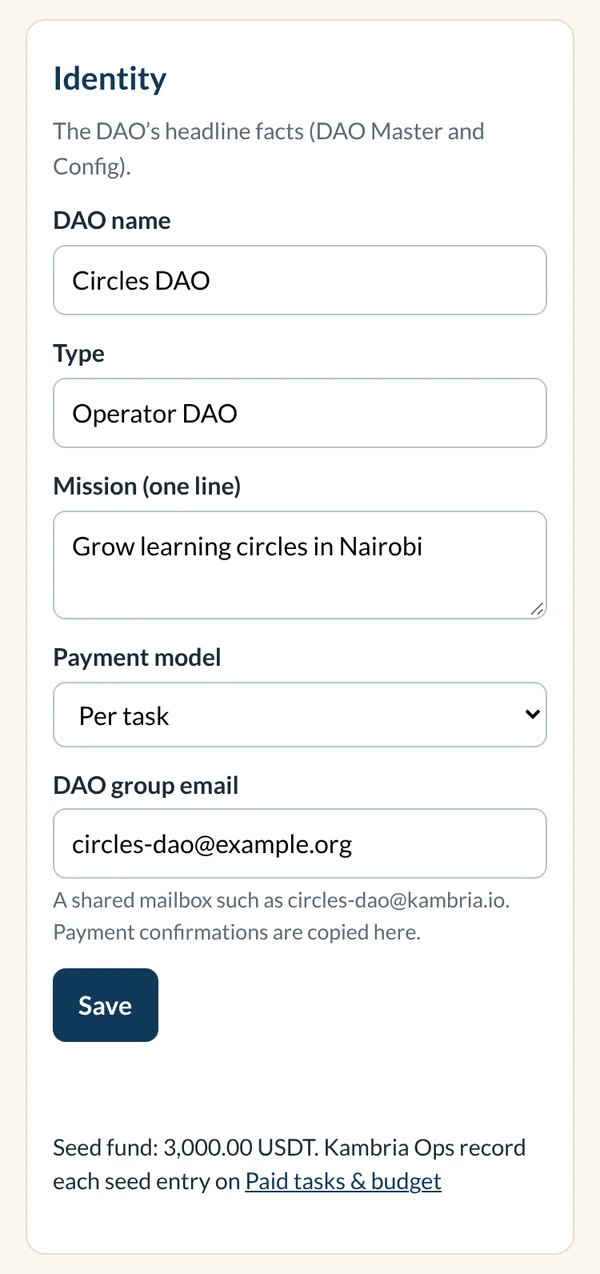
- In Identity, fill in DAO name, Type, Mission (one line), Payment model and DAO group email. Tap Save. The card says Saved.
- In KDF on-chain, check the DAO's addresses. For a DAO on the Kambria DAOs Framework they are read from the public ledger: Shared fund, Vault (revenue in, shared by the split), Payment desk, Task budget (paid tasks), GT (votes) and LP. Nobody types them in. Fill in only Chain, Chain ID, GT symbol, LP symbol and Accepted token, then tap Save.
- Tap Open the public ledger on the Kambria DAOs Framework to see the DAO's money on the ledger.
- In File library, add the DAO's live documents. Type the Document name and its Link (https://…), add a Note if useful, then tap Add.
- In Nodes and community partners (optional), add each partner with Node or partner, Representative, Location and Contact or link. Tap Add.
- In Event catalog, add your DAO's own events: Event ID, Event, Date, Phase, Points and Counts toward score. Tap Add.
- To change a row in a list, tap Edit, change it and tap Save changes. To remove it from view, tap Hide.
Good to know
- Payment model decides how contributors are paid: Per task, Pool or None (nobody is paid per task). Only DAOs that pay Per task add paid tasks to a Pay-Per-Task Scheme. Changing the model applies to new tasks only: paid tasks the DAO already has stay, read-only, and are still paid at their rate.
- The DAO group email is a shared mailbox. Confirmation emails for Verified deliverables and payment confirmations are copied there.
- Scoring rules (the Low band, Mid band and Phase cleared values) are read-only for you. The card says Set by Kambria Ops.
- The seed fund is shown under Identity. Kambria Ops record each seed entry on Paid tasks & budget; you cannot change it here.
- Events tagged Cohort are shared by every DAO in the cohort, and only Kambria Ops change them. You can edit and hide only events tagged This DAO.
- Nothing is deleted. A hidden row stays in the change history.
- A DAO that isn't on the framework yet still shows the old boxes: Treasury (GT) address (framework v1), Revenue Vault contract, Revenue Splitter contract and Payout Executor contract. The card says This DAO isn’t on the Kambria DAOs Framework yet. Once it is, its addresses are read from the public ledger and these old fields go away. What was typed stays in the database.
- An address shows (not set up) when that part is not set up on the framework yet.
If something goes wrong
- DAO name: Required. The DAO name can't be empty.
- That doesn’t look like an email address. Check the DAO group email.
- An address starts with 0x and has 40 more letters or numbers. Copy the full address again. This shows only for the old boxes of a DAO not on the framework yet.
- A link starts with https://
- Use letters, numbers and dashes, for example D3-KO. This is about the Event ID.
- You can’t change this. You are not the DAO Lead of this DAO, or the item belongs to Kambria Ops.
- Couldn’t save. Check the fields and try again.