
Organizers
Approve and remove members
Updated 26 Nov 2026
This guide helps the Organizer approve new members and remove members who left, so only the right people can take payments for the DAO.
Before you start
- The person is in the DAO's Roster in the DAO Workbook. Kambria Ops adds people there.
- The person has set up their account on My account. Without it they show No account yet and can't be approved.
- Your own account is set up and holds the Organizer role in this DAO.
Steps
- Open the ☰ menu. Under Organizer, tap DAO page and members.
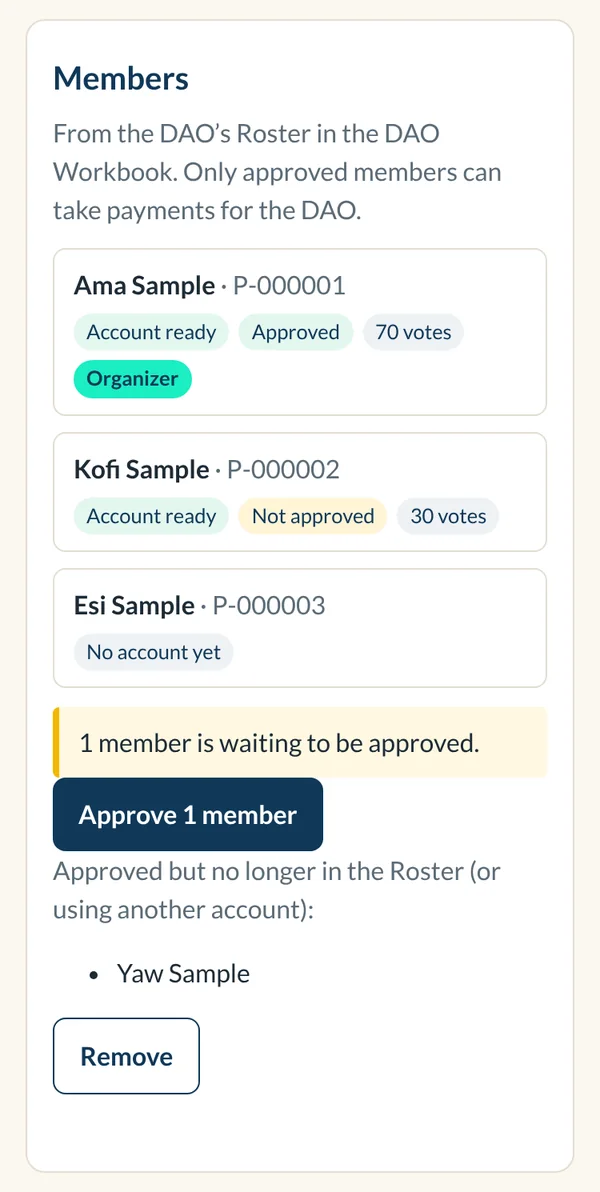
- Scroll to Members. Each person shows Account ready or No account yet, and Approved or Not approved.
- If someone is waiting, you see for example 2 members are waiting to be approved. Tap Approve 2 members.
- You see Working… confirm with your screen lock. Confirm with your fingerprint, face or PIN.
- Wait for Done. The page reloads and the people now show Approved.
- To remove people, look under Approved but no longer in the Roster (or using another account):. Check the names, then tap Remove and confirm with your screen lock.
Good to know
- Approve and Remove act on everyone in the list at once. You can't pick one person.
- The list comes from the DAO Workbook. Someone shows for removal when they left the Roster or changed their main account.
- Removing someone only stops new payment requests that name them. Requests they already opened and money already shared to them stay as they are.
- Approving does not give votes. Votes (GT) are given by a proposal.
- Kambria pays the network fee for you. You never pay anything.
If something goes wrong
- That didn’t work. Please try again. Reload the page and try once more. If it keeps happening, tell Kambria Ops.
- Too many actions today. Please try again tomorrow. There is a daily limit on actions Kambria pays for. Wait until tomorrow.
- The screen lock was cancelled. Please try again. Tap the button again and finish the screen lock.
- You don't see the buttons: your main account doesn't hold the Organizer role in this DAO. Ask Kambria Ops.