
Customers & the public
Check a DAO's IP record
Updated 26 Nov 2026
This guide helps anyone check a DAO's IP declaration, so they can trust that the file they read is exactly the one the DAO recorded.
Before you start
- You know the DAO's code, or you have the link to its public IP page.
- You don't need to sign in.
Steps
- Open ip-public.html?code=<DAO code> on this site. Members can also tap Public page (anyone can check it) on the DAO's IP page.
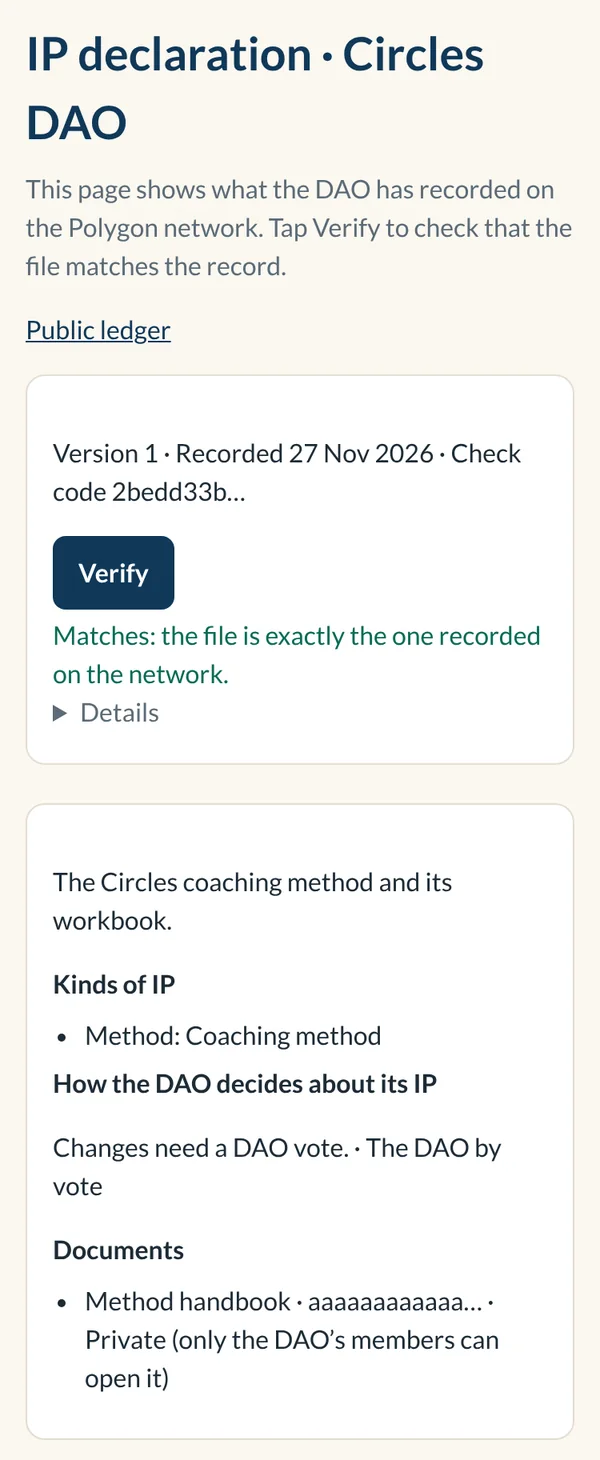
- At the top you see Version <number> · Recorded <date> · Check code <first characters>…. If there was an earlier version you see Previous version: check code ….
- Read the declaration below: what it covers, Kinds of IP, what is not included, Why it is owned together, How the DAO decides about its IP, the works and the Documents.
- Tap Verify. The page shows Checking…, loads the file again and compares it with the record.
- Read the result:
- Matches: the file is exactly the one recorded on the network. – all good.
- Does not match: the file is not the one recorded on the network. – the file was changed. Don't trust it; tell the DAO.
- Could not load the file. Try again later. – the file could not be downloaded right now.
- Could not read the network. Try again later. – the record could not be read right now.
Good to know
- Documents show their title and the start of their check code. Most are Private (only the DAO’s members can open it). A document the DAO made public has Download.
- Tap Details to see the full Check code (full), the Record number and Open the declaration file.
- A link at the top opens the DAO's Public ledger.
- Warning: the record is no longer held by the DAO’s shared fund. means the record has left the DAO's shared fund. Ask the DAO why.
If something goes wrong
- This DAO has not recorded an IP declaration. – the DAO has no IP record yet.
- IP records aren’t set up on this site yet. – try again later.
- Could not load the file. Try again later. shows instead of the declaration – the file is out of reach now; the record itself is still shown.