
Guardians
Stop a revenue-sharing cycle
Updated 27 Nov 2026
This guide helps Guardians revoke a revenue-sharing cycle during its check time, so wrong amounts are never paid.
Before you start
- An account with the Guardian role is linked on My account.
- The cycle shows Check time. Once it is Final, a Guardian can’t revoke it.
Steps
- Open the ☰ menu and choose Revenue sharing (Guardian group).
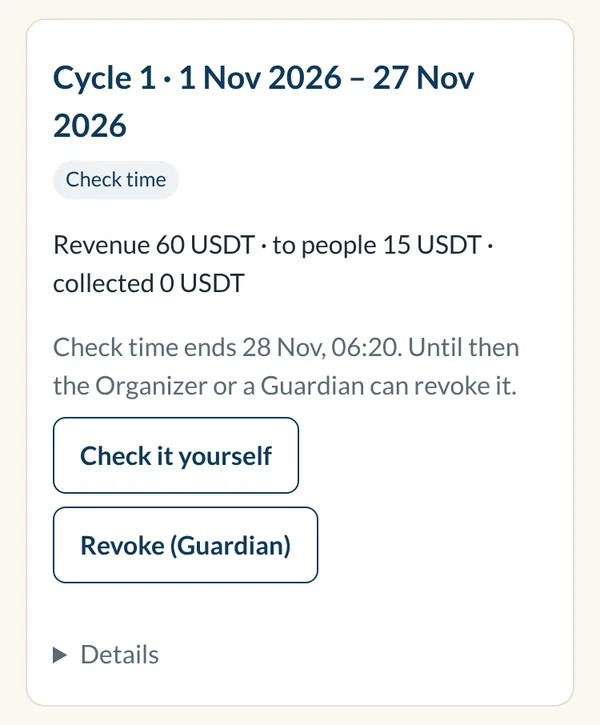
- Under Cycles, find the cycle. Read Check time ends to see how long you have.
- Click Check it yourself. If you see Something doesn’t match:, the problems are listed below it.
- Look also for the red tag Doesn’t match: the public ledger worked the cycle out again from the network and got a different result.
- If the cycle is wrong, click Revoke (Guardian).
- Read Revoke this cycle? Its orders can then go in a new cycle. and click OK.
- Confirm with your screen lock (or in MetaMask, if the role is on your MetaMask). Wait for Done. The cycle now shows Revoked.
Good to know
- Revoking moves no money to anyone. The orders wait, and the Operator can put them in a new cycle.
- Tell the Operator and the members why you revoked it.
- If something bigger is wrong, you can also stop all payouts for 14 days: see Pause payouts in an emergency.
- After the check time, only the Organizer can revoke a final cycle, and only while nobody has collected from it.
- On the same page you can stop a waiting change to the split or receiving accounts with Stop the waiting change (Guardian), during its 3 days.
If something goes wrong
- The public list couldn’t be loaded.: reload the page and try Check it yourself again.
- The screen lock was cancelled. Please try again.: click again and confirm.
- Too many actions today. Please try again tomorrow.: wait a day, but act before the check time ends. If time is short, contact Kambria Ops.
- That didn’t work. Please try again.: try again; if it keeps failing, contact Kambria Ops at once.