
Order Handlers
Create a payment request
Updated 26 Nov 2026
This guide helps Order Handlers ask a buyer to pay the DAO, so the money goes straight to the DAO and is recorded from the start.
Before you start
- You are an approved member of the DAO (see Order Handlers).
- You know the buyer's email, the amount in USDT and what it is for.
- The Organizer has added at least one type of revenue (for example Service). If not, the page shows The Organizer hasn’t added any types of revenue yet.
Steps
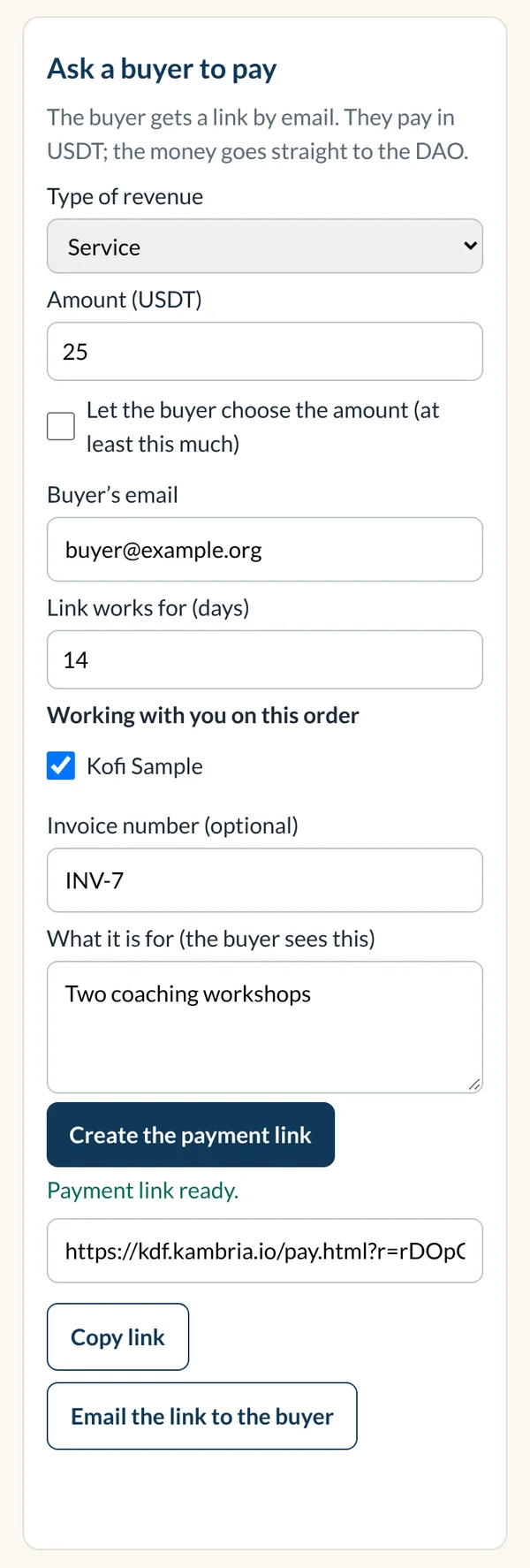
- Open the ☰ menu and tap Payments and orders (group Order Handlers), or open your DAO page and tap Payments and orders.
- In Ask a buyer to pay, choose the Type of revenue.
- Enter the Amount (USDT). To let the buyer pay more, tick Let the buyer choose the amount (at least this much).
- Enter the Buyer’s email.
- Check Link works for (days). It starts at 14; you can choose 1 to 90 days.
- If other members work with you, tick their names under Working with you on this order (see Add co-handlers to an order).
- Add an Invoice number (optional) and fill in What it is for (the buyer sees this).
- Tap Create the payment link and confirm with your screen lock. Wait for Payment link ready.
- Tap Email the link to the buyer. You see Email sent. You can also tap Copy link and send it yourself.
Good to know
- The buyer gets an email from payment@kambria.io with the amount, the last day to pay and a button See how to pay.
- The buyer needs no account. Their page never shows their email or your name. You pay no fee.
- In My orders the status goes Waiting for payment → Paid – deliver it → Done.
- Tap Check payment to look for the money now. Tap Give the link 14 more days if the buyer needs more time, even after Link expired.
- A wrong amount, a late payment or a second payment is held back. The Organizer sees it under Money held back.
If something goes wrong
- Choose a type of revenue. – pick one, or ask the Organizer to add one.
- The amount must be more than 0 (at least 1 USDT if the buyer chooses)., Check the buyer’s email. or The link can work for 1 to 90 days. – fix that field.
- An email was just sent. Please wait 10 minutes before sending again. – wait, or copy the link instead.
- The network refused it. Is everyone on the order an approved member? – untick people who are not approved, or ask the Organizer to approve them.
- Too many actions today. Please try again tomorrow. – wait until tomorrow.
- No payment has arrived yet. – ask the buyer to check they paid.