
Organizers
Set revenue types and order rules
Updated 27 Nov 2026
This guide helps the Organizer manage the types of revenue members choose when they ask a buyer to pay, and the order rules.
Before you start
- You hold the Organizer role for this DAO in the DAO Workbook (or you are Kambria Ops).
- Agree the types of revenue with the DAO first, for example Service or Course.
Steps
- Open the ☰ menu. Under Organizer, tap DAO page and members.
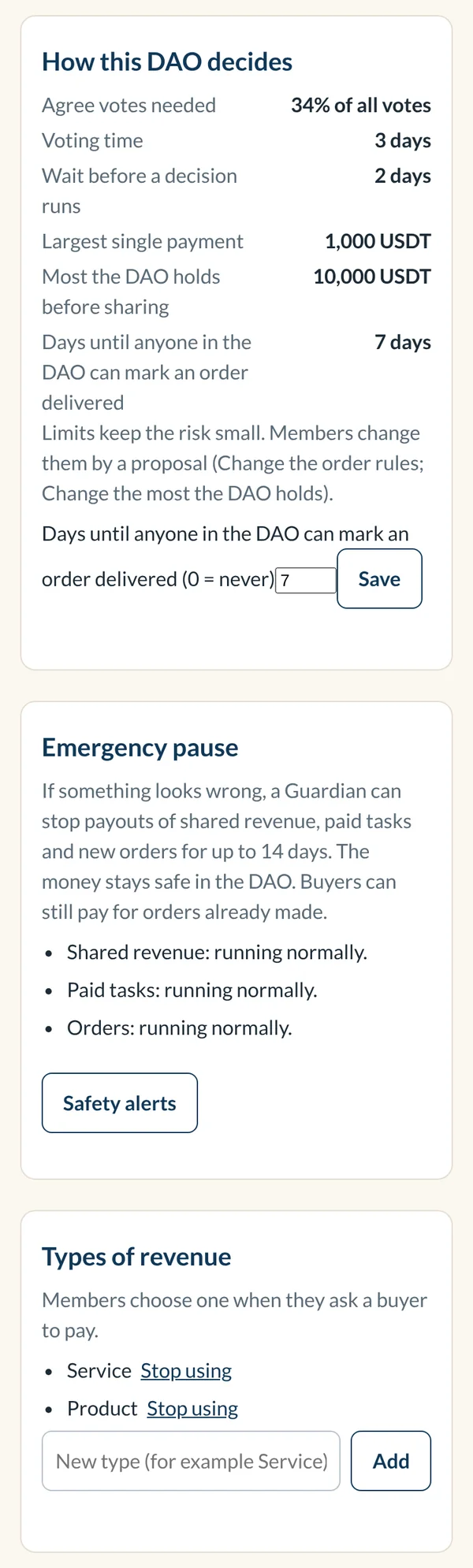
- Scroll to Types of revenue.
- Type a name in the box New type (for example Service) and tap Add. It appears in the list.
- To stop a type, tap Stop using next to it. It turns grey and members can no longer choose it.
- To bring it back, tap Use again.
- To see the order rules, scroll to How this DAO decides: Largest single payment, Most the DAO holds before sharing and Days until anyone in the DAO can mark an order delivered.
- To change the days, type a number in Days until anyone in the DAO can mark an order delivered (0 = never) and tap Save. Confirm with your screen lock and wait for Done.
Good to know
- Types of revenue are saved straight away. No vote and no screen lock are needed.
- Members see only the types in use when they fill in Type of revenue on Payments and orders. If there are none, they see The Organizer hasn’t added any types of revenue yet.
- Days until anyone in the DAO can mark an order delivered is the number of days after a buyer pays from which anyone approved in the DAO can mark the order delivered (under Orders past their delivery date on Payments and orders). The default is 7 days; 0 shows Never (the member marks it delivered).
- Kambria Ops sets the order rules when it creates the DAO. You change the days on the DAO page, directly. Largest single payment changes only by a proposal: Change the order rules on Proposals and votes, then members vote. If the Organizer role is with the shared fund, the days change by that proposal too. Most the DAO holds before sharing can’t be changed in the app; ask Kambria Ops.
- A stopped type can't be deleted. This keeps old orders readable.
If something goes wrong
- That didn’t work. Please try again. The name may already exist, or the connection dropped. Check the list, then try again.
- You don't see the box or the buttons: you don't hold the Organizer role in the DAO Workbook. Ask Kambria Ops.
- Use a whole number of days from 0 to 365. Fix the number and tap Save again.