
Operators
Propose a revenue-sharing cycle
Updated 26 Nov 2026
This guide helps Operators share the money from completed orders, so everyone gets their part by the DAO’s split.
Before you start
- Your account is set up on My account and your main account has the Operator role.
- At least one order is completed. If not, the page says No money from completed orders is waiting to be shared.
Steps
- Open the ☰ menu and choose Revenue sharing (Operator group). Or open the DAO page and click Revenue sharing on the Shared fund card.
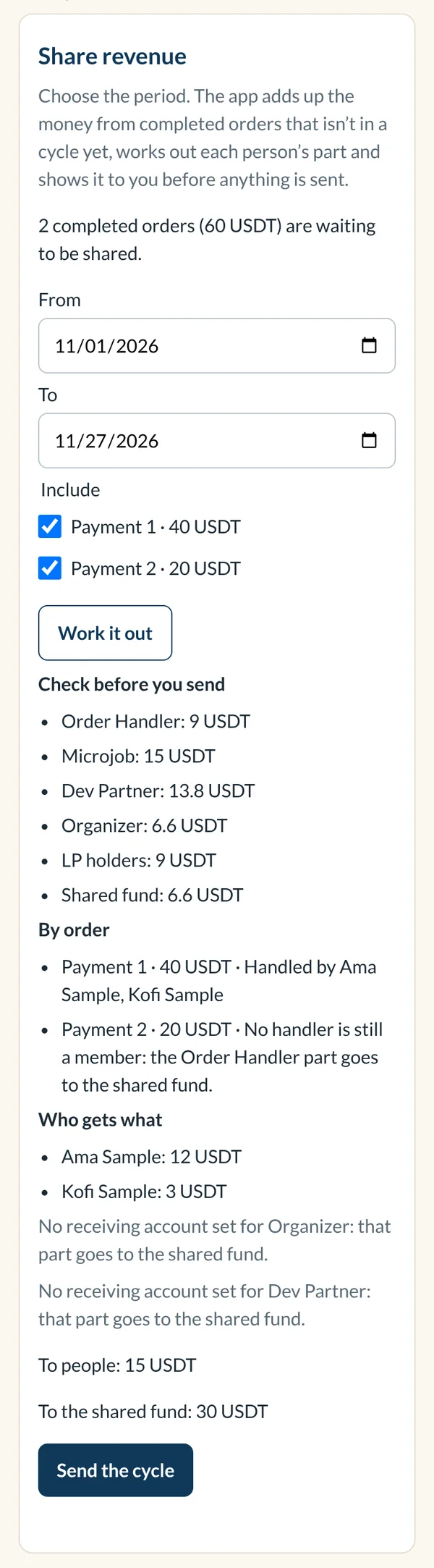
- In the Share revenue card, read how many completed orders are waiting.
- Choose the period: From and To. To is today at first. From must be after the end of the last cycle.
- Under Include, untick any order you want to leave for the next cycle. All orders are ticked at first.
- Click Work it out. The app gathers the orders, their handlers and the LP balances.
- Read Check before you send: the part of each pool, By order, Who gets what, To people and To the shared fund.
- If it looks right, click Send the cycle and confirm with your screen lock. You see Sent. The check time has started.
- The cycle now shows Check time in the Cycles list. Click Check it yourself to compare it with the network. All good means it matches.
- When the check time is over, the cycle says The check time is over. Anyone in the DAO can make it final. Click Make it final.
Good to know
- During the check time the Organizer or a Guardian can revoke the cycle. Its orders can then go in a new cycle.
- After Make it final, people with money get an email. If automatic payout is on, they are paid without doing anything; if not, they collect on Earnings.
- The Microjob part goes to the paid-task budget, not to people.
- Doesn’t match: the public ledger worked the cycle out again from the network and got a different result. Do not make it final. Tell the Organizer or a Guardian so they revoke it during the check time.
If something goes wrong
- The period must start after the last cycle: choose a later From date.
- The end must be on or after the start, and not in the future.: fix the dates.
- Choose at least one order. or At most 80 orders in one cycle.: tick or untick orders.
- Some LP couldn’t be matched to a member. Ask Kambria Ops to check before sharing.: do not send; contact Kambria Ops.
- The list couldn’t be published. Nothing was sent. or Sending didn’t work. Nothing was shared.: try again.
- Too many actions today. Please try again tomorrow.: wait a day.