
Members & LP holders
Your recovery words and a new device
Updated 26 Nov 2026
This guide helps members see their recovery words again and get their account back on a new phone, a new computer or a new site address.
Before you start
- You are signed in on My account (see Sign in and set up your account).
- To restore, have your paper with the 12 recovery words.
- A passkey belongs to one site address. For example, a passkey made on the old test address does not work on kdf.kambria.io. On a new address you restore once with your 12 words.
Steps: see your words again
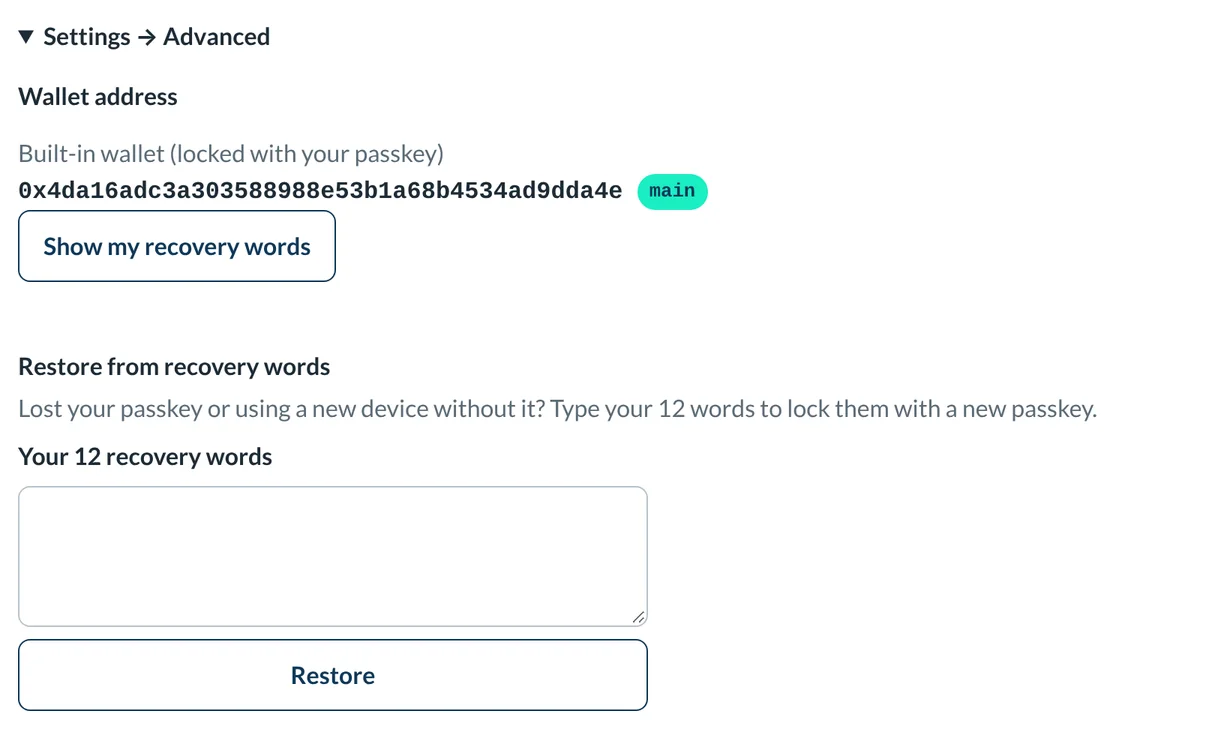
- On My account, open Settings → Advanced at the bottom.
- Tap Show my recovery words and confirm with your screen lock.
- Check your paper against the words. Tap Hide when you are done.
Steps: restore on a new device or a new site address
- Sign in with your email on the new device or address.
- On My account, open Settings → Advanced and go to Restore from recovery words.
- Type all 12 words in Your 12 recovery words, in order, with a space between them.
- Tap Restore. Save the new passkey on this device or in your Google or Apple account, and confirm with your screen lock.
- You see Restored. Your account is locked with the new passkey. Your account, your votes and your earnings are the same as before.
Good to know
- If your passkey is saved in your Google or Apple account, it may already work on your new phone with the same account. Then you don't need to restore.
- Restore when an action keeps saying The screen lock was cancelled. Please try again. even though you did not cancel: often this device has no passkey for this address.
- Your recovery words never change. Keep the paper safe and never share it.
If something goes wrong
- Those aren’t 12 valid recovery words. Check the spelling and the order. Check each word against your paper. Use only lowercase letters and spaces.
- The passkey was saved somewhere that can’t lock your account Choose this device or your Google or Apple account, not a password manager like LastPass.
- We couldn’t set up your account. Please try again. Try again; if it keeps happening, tell Kambria Ops.
- Lost both your words and your passkey? Nobody, not even Kambria, can open your account. Tell Kambria Ops at once.