
Operators
Send a paid task list
Updated 27 Nov 2026
This guide helps Operators list the tasks people did, so a task approver can check them and the DAO pays a fixed price for each.
Before you start
- Your main account on My account has the Operator role.
- Each task has a price in Tasks and prices. The Organizer sets prices.
- Each person on the list is in the DAO and has set up their account.
- To pay deliverables from the DAO Workbook: you also hold the Operator role in the Workbook, and the Organizer added the task with Add from Pay-Per-Task.
Steps
- Open the ☰ menu and choose Paid tasks (Operator group).
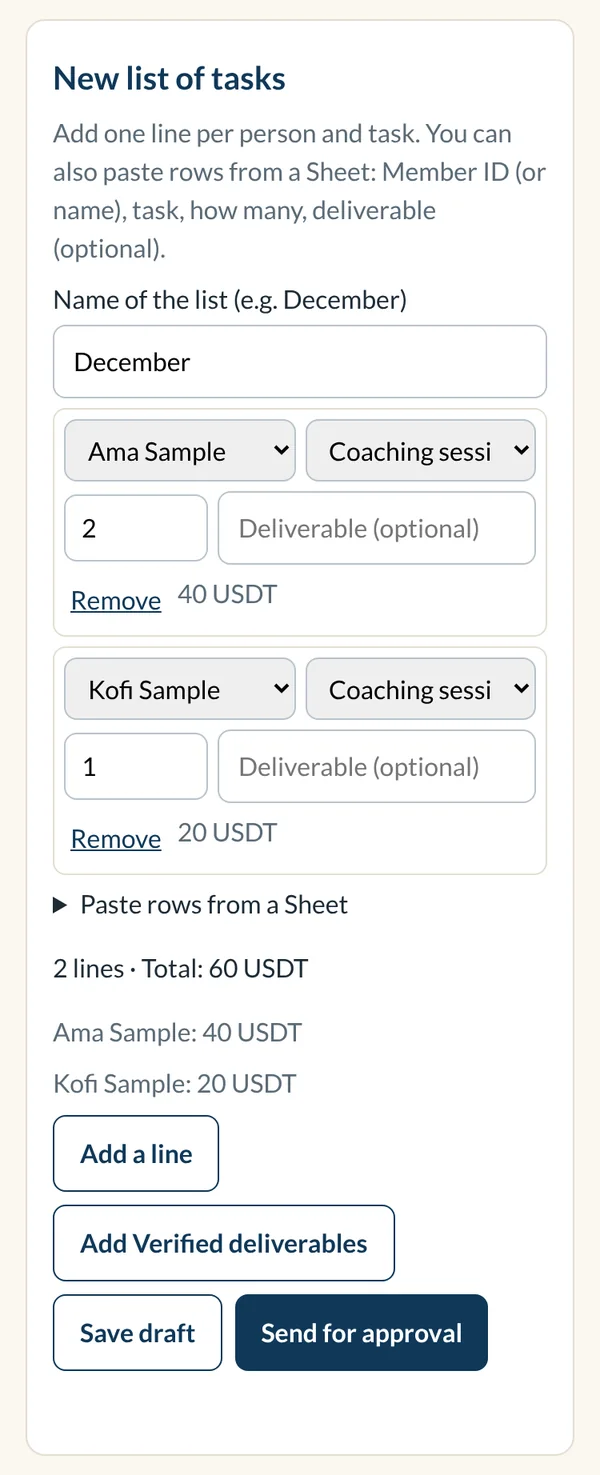
- In New list of tasks, fill in Name of the list (e.g. December).
- To pay Verified deliverables from the DAO Workbook, click Add Verified deliverables. The app adds one line per person and deliverable that is Verified and not paid yet, with the deliverable code. How many shows the person's part, for example 50% of 1 task or 33.33% of 1 task. You see, for example, Added 3 lines from Verified deliverables. Remove any you don’t want to pay now.
- To type a line, click Add a line. Choose the Person and the Task, type How many, and add a Deliverable (optional).
- To paste from a Sheet, open Paste rows from a Sheet. Paste rows with these columns: Member ID (or name), task, how many, deliverable (optional). Click Add these rows.
- Check every line. A line in red has a problem written under it. Fix it, or click Remove.
- Check the total under the lines. It shows each person’s amount.
- Click Save draft if you want to finish later. Drafts are kept under Drafts.
- When all is right, click Send for approval and confirm with your screen lock. You see Sent. A task approver will check it.
- The list appears under Lists with Waiting for approval.
Good to know
- You cannot approve your own list. Another person with the task approver role does it.
- Rows pasted from a Sheet can use tabs or commas. A heading row is skipped.
- A list has at most 300 lines.
- The price used is the price on the day you send. Later price changes do not change a sent list.
- If the total is more than the budget, the list can be sent but can’t be approved until the budget grows.
- If a list is Sent back, read the approver’s note on the list card, then make a new list with the fixes.
- A line for someone without an account shows has no account yet (ask them to set it up on My account). Click Remove for now: the deliverable comes back the next time you click Add Verified deliverables, once they have set up their account.
- A deliverable already in a list that waits or is approved, or already paid in the Workbook Cashbook, is not added again. If nothing is left you see Nothing new to add: every Verified deliverable of a linked task is already in a list or paid in the Workbook Cashbook.
- Someone who left the DAO but did the work is still added, with their account if they have one.
- After a task approver approves the list, people can collect 24 hours later. The list shows Ready to collect from <…>. Until then a Guardian can still stop this list., then Ready to collect on Earnings.
- When people collect, the DAO Workbook adds a Cashbook line for each person and deliverable by itself, and the deliverable shows "Paid on KDF" there. See How the Workbook and the Framework work together.
If something goes wrong
- Fix the lines in red first.: a line has a problem.
- not in this DAO: the person is not a member; check the Member ID.
- has no account yet (ask them to set it up on My account): the person must set up their account first.
- this task has no price: ask the Organizer to set a price.
- must be a whole number from 1 or deliverable is too long (31 characters at most): fix the line.
- Give the list a name.: fill in the name.
- The DAO Workbook couldn’t be read. Only the DAO’s Organizer or Operator (in the Workbook) can use it.: ask Kambria Ops to give you the Operator role in the DAO Workbook.
- That didn’t work. Please try again.: try again; if it keeps failing, tell Kambria Ops.