
Kambria Ops
Create a DAO
Updated 27 Nov 2026
This guide helps Kambria Ops put a DAO on the network, so its members can take payments, share revenue and vote in the app.
Before you start
- The DAO is in the DAO Workbook with its code, name and Roster.
- Members who should get votes have set up their account on My account.
- Your own account is set up (My account).
Steps
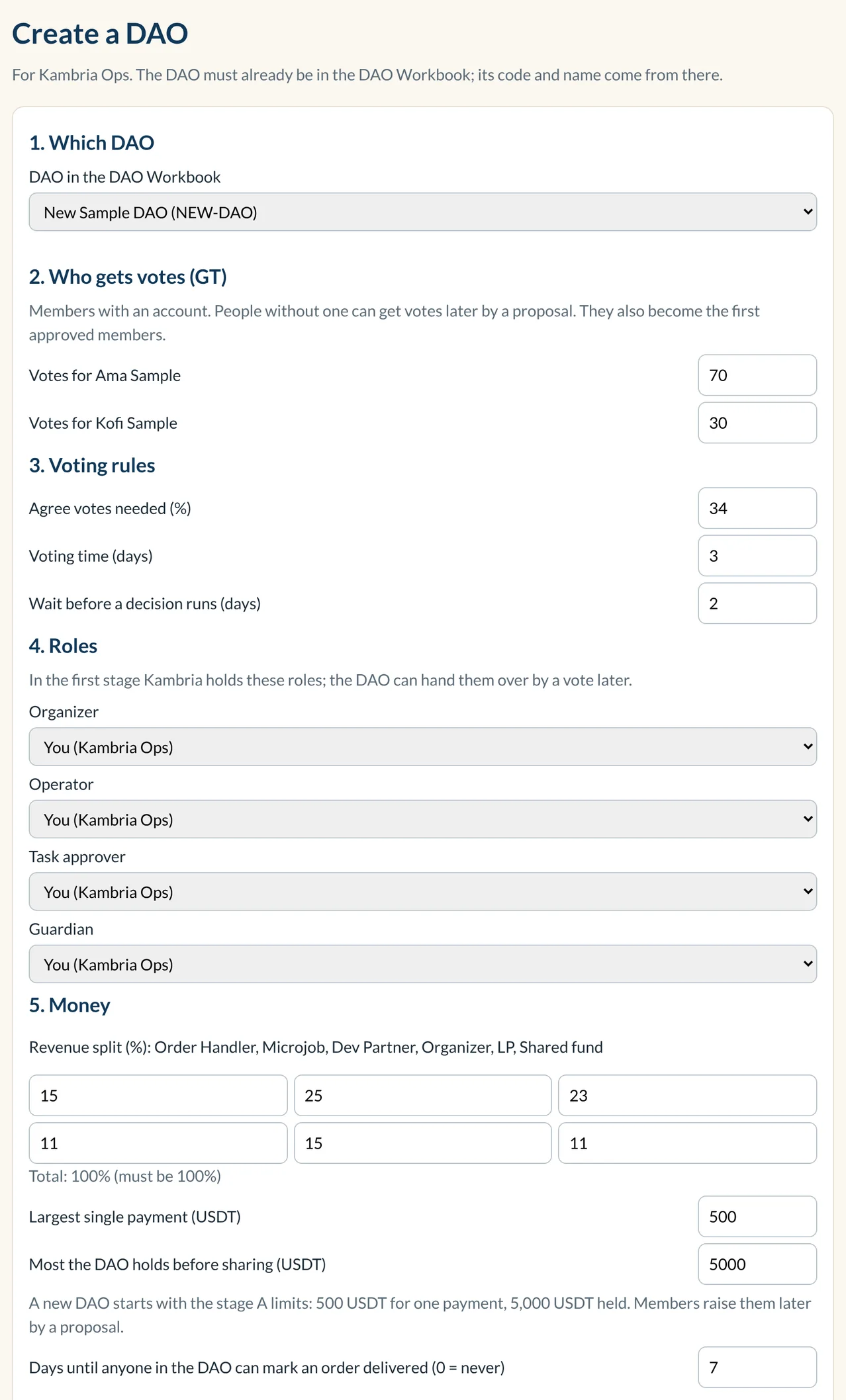
- Open the ☰ menu. Under Kambria Ops, tap Create a DAO.
- Under 1. Which DAO, choose it in DAO in the DAO Workbook.
- Under 2. Who gets votes (GT), for each member, fill in Votes for their name. Each starts at 1. Put 0 for someone who should get none.
- Under 3. Voting rules, Agree votes needed (%) (default 34), Voting time (days) (default 3) and Wait before a decision runs (days) (default 2).
- Under 4. Roles, choose the Organizer, Operator, Task approver and Guardian. Each starts as You (Kambria Ops).
- Under 5. Money, check the Revenue split (%): Order Handler, Microjob, Dev Partner, Organizer, LP, Shared fund (default 15, 25, 23, 11, 15, 11; Total must be 100%), Largest single payment (USDT) (1,000), Most the DAO holds before sharing (USDT) (10,000) and Days until anyone in the DAO can mark an order delivered (0 = never) (7).
- Under 6. Check and create, read These contracts will be created:, then tap Create the DAO and confirm with your screen lock.
- Wait for Created. (it can take a minute), then tap Open the DAO page.
Good to know
- Everyone who gets votes also becomes an approved member. Others can be approved later on the DAO page.
- People without an account can get votes later by a proposal. Nobody gets LP when the DAO is created.
- Days until anyone in the DAO can mark an order delivered (0 = never): from that many days after payment, anyone approved in the DAO can mark an order delivered. Later the Organizer changes it on the DAO page; Largest single payment changes by a proposal (Change the order rules).
- In the first stage Kambria holds the roles; the DAO can hand them over by a vote later.
- On the test version a banner says Test version: the USDT here is test money with no value. Do not send real USDT.
If something goes wrong
- This DAO is already on the network. Open its DAO page instead.
- Nobody in this DAO’s Roster has an account yet. Ask members to set up My account first.
- The revenue split must add up to 100%., Give votes to at least one member., Agree votes needed must be between 1% and 100%., Voting time and the wait must each be at least 1 day., Limits must be more than 0.: fix that field and tap Create the DAO again.
- Only Kambria Ops can create a DAO. Your email isn't Kambria Ops in the DAO Workbook.
- Your account isn’t set up yet (My account). Set it up, then come back.