
Order Handlers
Mark an order delivered
Updated 27 Nov 2026
This guide helps Order Handlers mark a paid order as delivered, so its money can be shared in the next revenue cycle.
Before you start
- The buyer has paid: the order shows Paid – deliver it.
- You have delivered the work or product to the buyer.
- You made the order, or you are the DAO's Organizer. After the order's date (see below), any approved member can do it.
Steps
- Open Payments and orders and find the order in My orders.
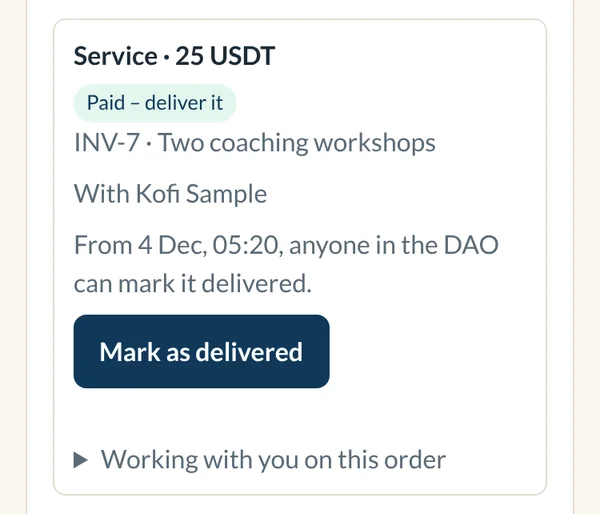
- Check it shows Paid – deliver it.
- Tap Mark as delivered and confirm with your screen lock.
- Wait for Done. The order now shows Done.
Good to know
- Only paid and completed orders go into revenue sharing. Until you mark it delivered, the money waits.
- Each DAO sets a number of days after payment (often 7). A paid order shows From <date>, anyone in the DAO can mark it delivered. On the DAO page the number is under Days until anyone in the DAO can mark an order delivered; the Organizer can change it there.
- After that date the order also shows to every approved member under Orders past their delivery date on Payments and orders, with its own Mark as delivered button. It still waits until someone taps it, so tap Mark as delivered as soon as you deliver.
- Once Done, the order can't go back, and the people on it can't change.
- Co-handlers see the order but can't mark it delivered before its date. Tell the person who made it, or the Organizer.
If something goes wrong
- You don't see Mark as delivered – the order is not paid yet, it is already done, or you didn't make it and its date has not passed. Tap Check payment if the buyer says they paid.
- Too many actions today. Please try again tomorrow. – the daily limit of free actions is reached.
- That didn’t work. Please try again. – try again in a moment. If it keeps failing, tell the Organizer.