
Organizers
Write and update the IP declaration
Updated 26 Nov 2026
This guide helps the Organizer write the DAO's IP declaration and record it, so anyone can check what the DAO owns together.
Before you start
- You hold the Organizer role for this DAO in the DAO Workbook (or you are Kambria Ops).
- Have your documents ready as PDF or image files (20 MB at most), or as links with the check code of their PDF copy.
Steps
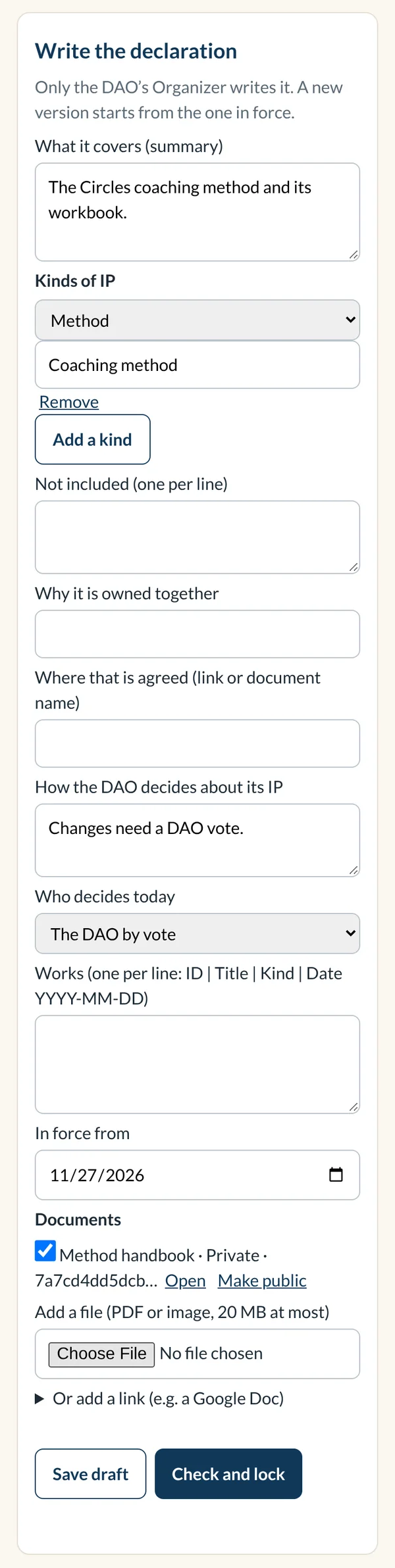
- Open the ☰ menu. Under Organizer, tap IP declaration. Find Write the declaration.
- Fill in What it covers (summary). Under Kinds of IP, choose a Kind, write What it is, and tap Add a kind for more.
- Fill in Not included (one per line), Why it is owned together, Where that is agreed (link or document name), How the DAO decides about its IP, Who decides today, Works and In force from.
- Under Documents, use Add a file (PDF or image, 20 MB at most), or Or add a link (e.g. a Google Doc) and tap Add the link. Tick Include for each document to list.
- Tap Save draft at any time.
- Tap Check and lock. You see Locked. Check the code below, then publish. Read the check code. To change something, tap Edit again.
- Tap Publish the declaration. You see Published. Now record it on the network.
- First version: tap Propose to record it (members vote). Members vote on the Proposals page.
- Later versions: tap Send this update (vote holders have 3 days to object).
Good to know
- Documents are private by default: only DAO members and Kambria Ops can open them. The public sees only their title and check code.
- Make public lets anyone download a document. It can't be undone.
- A published declaration file can't be changed or deleted. A new version starts from the one in force.
- An update can be stopped by objections from 10% of votes, or by a Guardian. If it was not stopped, after 3 days anyone can tap Apply the update.
- Anyone can check the record on the public page, Public page (anyone can check it).
If something goes wrong
- Check and lock lists what is missing, for example Write what it covers. or Add at least one kind of IP. Fill it in and try again.
- This file is bigger than 20 MB. Make the file smaller or add it as a link.
- Only the DAO’s Organizer can send an update. Your account doesn't hold the Organizer role on the network.
- After objections stopped the last update, a new one can be sent from a date: wait until then.