
Guardians
Pause payouts in an emergency
Updated 27 Nov 2026
This guide helps Guardians stop all payouts for a while when something looks wrong, so no money leaves the DAO while the members find out what happened.
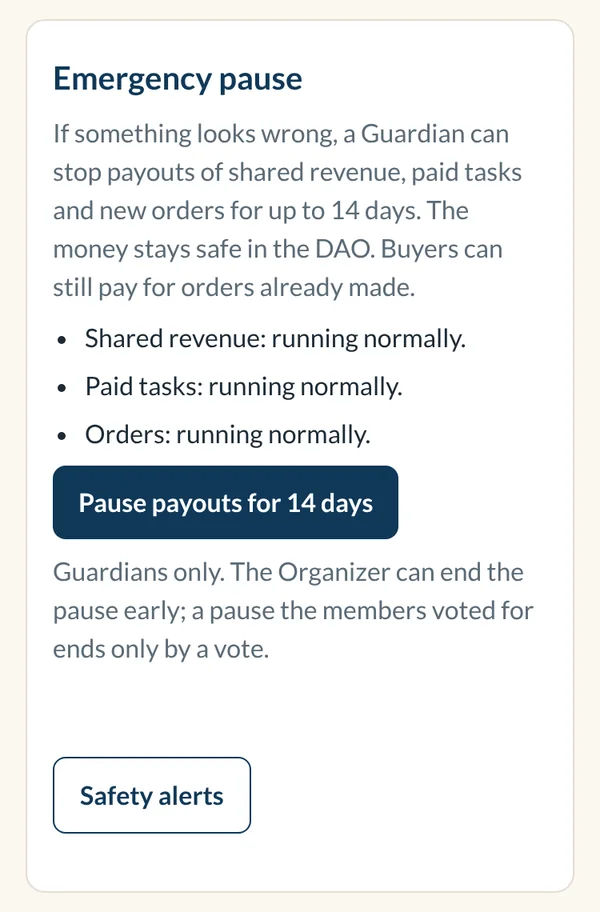
Before you start
- An account with the Guardian role is linked on My account.
- Something looks wrong, for example a revenue-sharing cycle with the red tag Doesn’t match, or task pay that should not go out.
Steps
- Open the ☰ menu. Under Members, tap DAO page and members.
- Scroll to Emergency pause. It says Payouts are running normally.
- Tap Pause payouts for 14 days.
- Read the message (it starts with Pause payouts for 14 days, until <date>?) and tap OK.
- Confirm with your screen lock (or in MetaMask, if the role is on your MetaMask). Wait for Done.
- The card now shows Payouts of shared revenue are paused until <date>. and Paid tasks are paused until <date>.
- Tell the Organizer and the members why you paused.
Good to know
- While payouts are paused, nobody can collect shared revenue or task pay, and no new sharing cycle or task list can go ahead. The money stays safe in the DAO.
- The pause ends by itself after 14 days. The Organizer can end it earlier with End the pause.
- After a pause ends, Guardians can’t pause again for 14 days.
- A pause the members voted for ends only by a vote.
- Everyone in the DAO sees the card, so members know payouts are paused. Only Guardians see the pause button.
- Pausing moves no money. To stop one decision or one cycle instead, see Cancel a proposal before it runs or Stop a revenue-sharing cycle.
If something goes wrong
- The network refused. A pause can’t start while one is on, or within 14 days after the last one ended. Check the card: payouts may already be paused. If it is urgent, contact Kambria Ops.
- The screen lock was cancelled. Please try again. Tap again and confirm.
- Too many actions today. Please try again tomorrow. If it is urgent, contact Kambria Ops at once.
- That didn’t work. Please try again. Try again; if it keeps failing, contact Kambria Ops at once.
- No Pause payouts for 14 days button: none of your linked accounts has the Guardian role, or payouts are already paused.