
Customers & the public
Pay a payment request
Updated 26 Nov 2026
This guide helps buyers pay a DAO from the link in their email, so the money reaches the DAO and the order is recorded.
Before you start
- You got an email from payment@kambria.io called "Payment request from <DAO name>".
- You have USDT on the Polygon network in an app you use, enough for the amount.
- You don't need an account on this site.
Steps
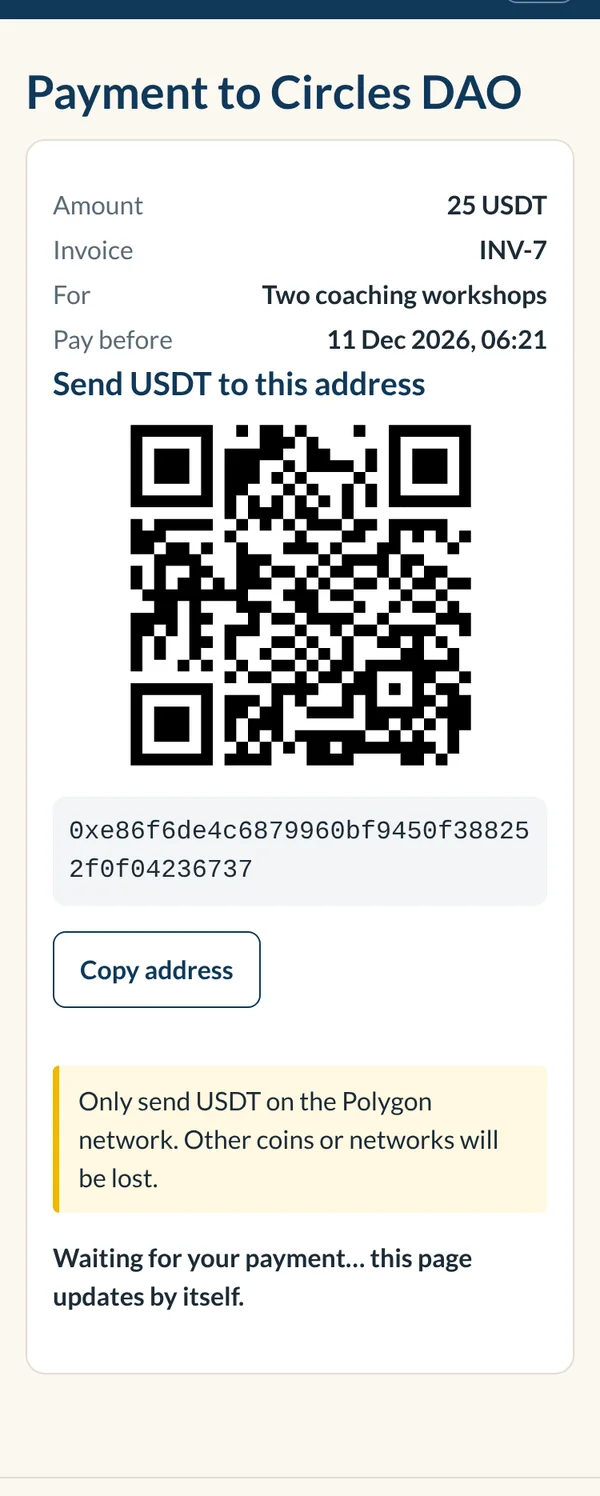
- In the email, tap See how to pay. The page Payment to <DAO name> opens.
- Check the Amount, the Invoice, what it is For, and Pay before.
- Under Send USDT to this address, scan the QR code, or tap Copy address.
- In the app where you keep your USDT, send the exact amount to that address. Choose the Polygon network. If the amount says "or more", send at least that much.
- Keep the page open. It shows Waiting for your payment… this page updates by itself. and checks again every few seconds.
- When the money arrives you may see Your payment arrived. Recording it…, then Payment received. Thank you! You are done.
Good to know
- Only send USDT on the Polygon network. Other coins or networks will be lost.
- The address is only for this one request. The money goes straight to the DAO.
- The page never shows your email or who made the request.
- If you send the wrong amount, pay after Pay before, or pay a second time, your money is not lost: it is held back by the DAO and is not counted as this payment. The page will not show Payment received. Thank you! Tell the seller. The DAO's Organizer can accept it, or the members can vote to send it back to you.
- On the test version a banner says: Test version: the USDT here is test money with no value. Do not send real USDT.
If something goes wrong
- This payment link isn’t valid. Please ask the seller for a new one. – the link is wrong or cut short. Open it again from the email, or ask the seller.
- This link has expired. Please ask the seller for a new one. – the seller can give the link 14 more days.
- We can’t check the payment right now. If you already paid, it is safe; the seller will see it. – the page can't reach the network. Try again later.
- You paid but the page still says it is waiting – keep the page open a few minutes. If it doesn't change, tell the seller the amount and time you paid.